
Finding the right and best 3D floor plan software or a 3D tool can transform how you design spaces, whether you’re a homeowner planning a renovation, a real estate professional showcasing properties, or an architect creating detailed blueprints. In 2026, the market offers diverse options from free online tools to professional-grade software, each catering to different needs and skill levels.
This comprehensive guide explores the best 3D floor plan creators, builders, and websites available today, helping you choose the perfect tool for your project requirements and budget.
Table of Contents
Overview of Top 3D Floor Plan Software
How Listings with Floor plans Attract More Residents Online? It is very much possible for people to advertise their rental properties for attracting more quality tenants online. The entire effort can be easy and simple by following few guidelines and tips. The landscape of 3D floor plan software has evolved significantly, offering powerful visualization capabilities that were once available only to professional designers. Today’s best 3D floor plan tools combine intuitive interfaces with robust features.
Key Features to Look For
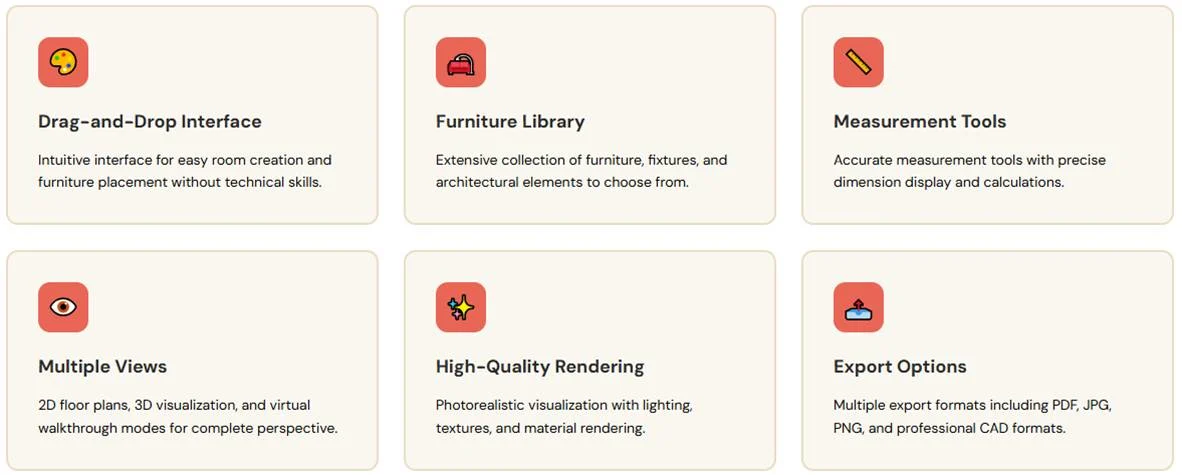
When selecting a 3D floor plan creator, consider these essential features:
-
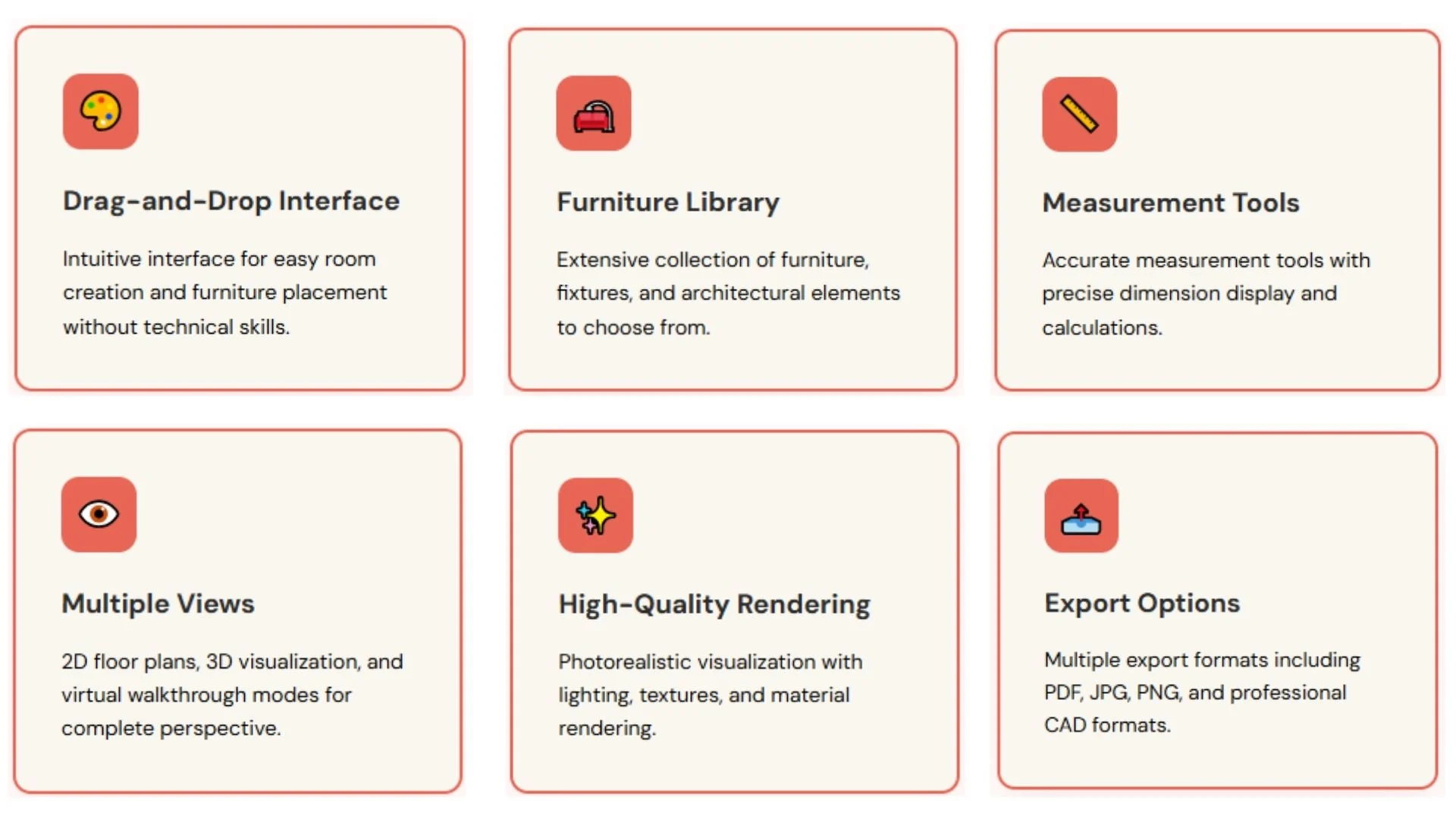
- Drag-and-drop interface for easy room creation and furniture placement
-
- Extensive library of furniture, fixtures, and architectural elements
-
- Accurate measurement tools and dimension display
-
- Multiple viewing angles including 2D, 3D, and virtual walkthrough modes
-
- High-quality rendering for photorealistic visualization
-
- Export options in various formats (PDF, JPG, PNG, DWG)
-
- Collaboration tools for team projects
Top Software Categories
Why include the floor plan in listings: With a neat floor plan present, listings are more likely to be improved. Tenants prefer to view a floor plan having proper measurements. This way, they can determine if their furniture will perfectly fit the area or not. The best 3D floor plan software falls into several categories based on user needs, from simple web-based tools for quick sketches to comprehensive platforms for professional architectural work. Understanding these categories helps you identify which 3D floor plan builder aligns with your specific requirements.
Also, Read: Difference Between 2D Floor Plans and 3D Floor Plans (2D vs 3D Plans)
Free vs. Paid 3D Floor Plan Tools
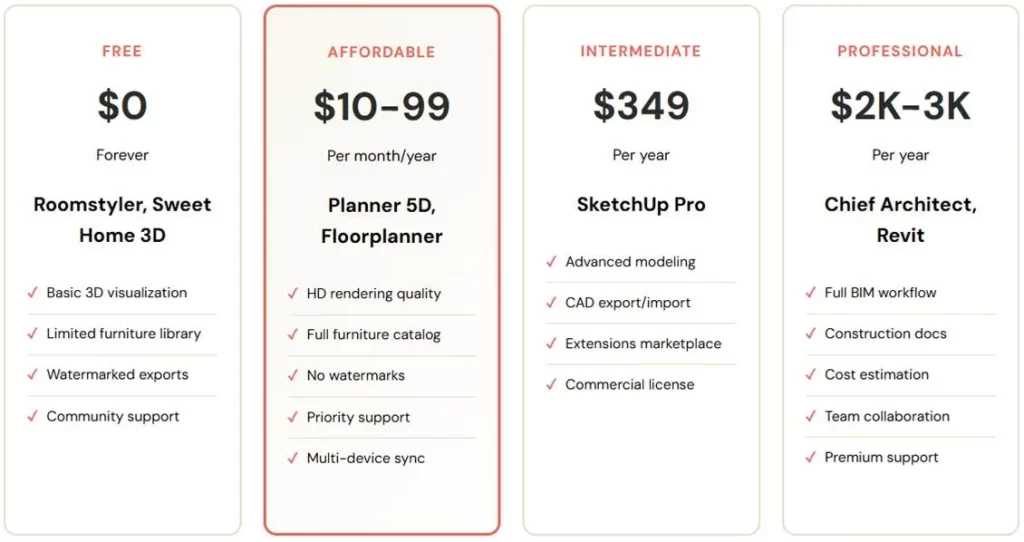
Choosing between free and paid options depends on your project complexity, frequency of use, and required features. Both categories offer viable solutions for different user scenarios.
Free 3D Floor Plan Makers
Free 3D floor plan websites provide excellent starting points for homeowners and students. These tools typically offer:
-
- Basic room design capabilities with standard shapes
-
- Limited furniture and fixture libraries
-
- 2D and basic 3D visualization
-
- Watermarked exports or limited file formats
-
- Restrictions on project size or number of designs
Popular free options include SketchUp Free, Floorplanner’s basic plan, and RoomSketcher Lite. These platforms work well for simple home projects, room planning, and concept visualization.
Paid 3D Floor Plan Software
Professional 3D floor plan creators justify their cost with advanced features:
-
- Unlimited projects and design complexity
-
- Extensive asset libraries with thousands of items
-
- Photorealistic rendering engines
-
- Advanced measurement and calculation tools
-
- Priority customer support and training resources
-
- Integration with other professional tools (CAD, BIM)
-
- Commercial usage rights without restrictions
Leading paid platforms include Chief Architect, AutoCAD Architecture, and Revit. These tools are essential for real estate professionals, interior designers, and architects who need reliable, high-quality output.
Making the Choice
Start with free versions to understand your needs. If you’re planning a single home renovation, free tools often suffice. For ongoing professional work, paid software offers better efficiency and results, making the investment worthwhile. Many paid platforms offer free trials, allowing you to test features before committing.
Also, Read: How Floor Plans are Important for Real Estate Agents?
Cloud-Based vs. Desktop Software
This way, the person is sure to stand out of the crowd and impress the potential tenants. To identify the best tenant, there is a need to target the largest tenant pool, thereby allowing the person to select a good tenant. and, in the same purpose, best 3D floor plan software selection is important step.
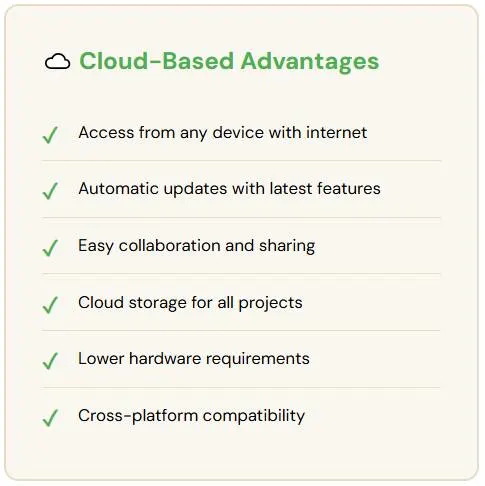
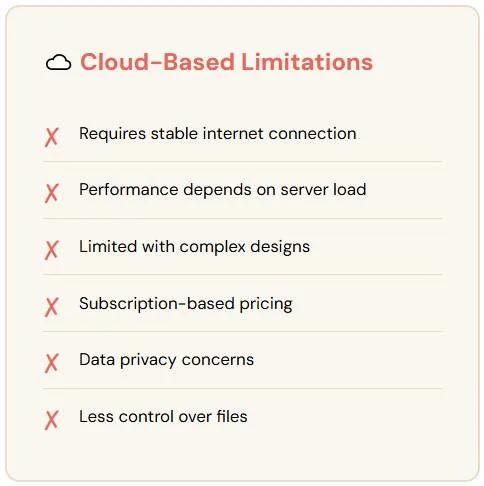
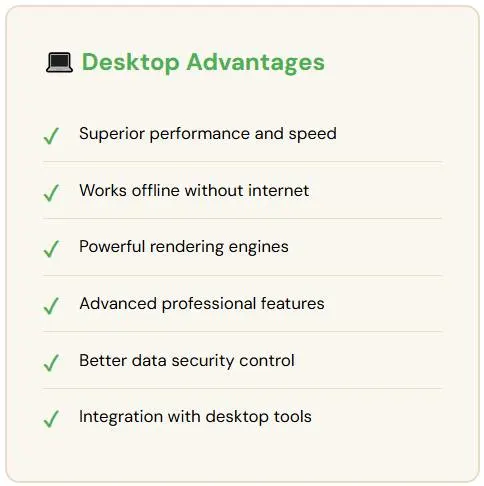
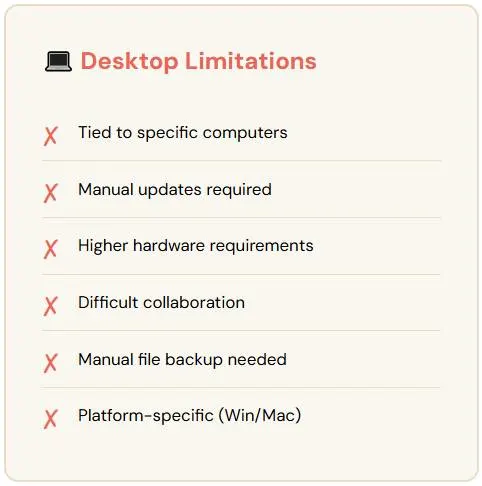
The debate between cloud-based and desktop 3D floor plan software centers on accessibility, performance, and workflow preferences. Each approach offers distinct advantages.
Cloud-Based 3D Floor Plan Websites
Cloud-based 3D floor plan makers operate entirely in web browsers, offering several benefits:
-
- No installation required—access from any device with internet
-
- Automatic updates with latest features
-
- Easy collaboration and sharing via links
-
- Cloud storage for all projects
-
- Lower hardware requirements—processing done on remote servers
-
- Cross-platform compatibility (Windows, Mac, Linux, tablets)
Popular cloud-based options include Planner 5D, Roomstyler 3D Home Planner, and Homestyler. These platforms excel for users who work across multiple locations or collaborate with clients and team members remotely.
However, cloud-based tools require stable internet connections and may experience performance limitations with extremely complex designs. Rendering speeds can vary based on server load and your internet bandwidth.
Desktop 3D Floor Plan Software
5# Tips for descriptions: Both the property and the location are to be marketed. Lifestyle factors like distance to CBD, access to transport and shopping are to be promoted. A good number of tenants seek locations close to work and school. Checking out the above is sure to help improve the listing and attract potential tenants. Desktop applications provide different advantages for power users:
-
- Superior performance utilizing full computer hardware capabilities
-
- Offline functionality—work without internet access
-
- More powerful rendering engines for complex visualizations
-
- Advanced features for professional architectural work
-
- Greater control over file management and data security
-
- Integration with other professional desktop software
Top desktop 3D floor plan builders include SketchUp Pro, Sweet Home 3D, and Live Home 3D. These applications are preferred by professionals who handle large, detailed projects requiring maximum computational power and offline capabilities.
The trade-off is less flexibility—you’re tied to specific computers where the software is installed, and collaboration requires manual file sharing rather than instant cloud syncing.
Hybrid Solutions
Some modern 3D floor plan creators offer hybrid approaches, combining desktop power with cloud convenience. These platforms provide desktop applications for intensive work while syncing projects to the cloud for access and collaboration. This model appeals to professionals seeking both performance and flexibility.
Also, Read: Creating Floor Plan Illustrations using Adobe Illustrator
Ease of Use: Software for Beginners
When seeking the new rental home, 78% of all tenants are said to go online. But it becomes crucial for the average homeowner to select an advertising option which can beat the competition and be at the top of the search page. For first-time users, the learning curve can make or break the experience with 3D floor plan software. Beginner-friendly platforms prioritize intuitive interfaces and guided workflows over comprehensive feature sets.
Best 3D Floor Plan Makers for First-Time Users
Beginner-friendly 3D floor plan websites share these characteristics:
-
- Visual drag-and-drop interfaces requiring no technical knowledge
-
- Pre-designed templates for common room types and layouts
-
- Automatic dimension calculations and snapping guides
-
- Simple furniture placement with realistic previews
-
- Built-in tutorials and tooltips throughout the interface
-
- Quick results with minimal clicks
Top picks for beginners include:
-
- Roomstyler: Exceptionally intuitive with impressive furniture catalog
-
- Planner 5D: User-friendly interface with helpful AI suggestions
-
- SmartDraw: Template-based approach perfect for quick layouts
-
- Floorplanner: Straightforward tools with excellent onboarding
Common Beginner Challenges and Solutions
New users often struggle with accurate measurements, proportion, and 3D navigation. The best beginner 3D floor plan creators address these issues through smart defaults, measurement assistance, and simplified camera controls. Look for tools offering preset room dimensions, automatic wall alignment, and single-click 3D viewing.
Many platforms now include AI-powered features that suggest furniture arrangements, optimal room layouts, and design improvements—perfect for users lacking design experience but wanting professional-looking results.
Learning Resources
Quality 3D floor plan software for beginners includes comprehensive learning materials. Video tutorials, interactive walkthroughs, and community forums accelerate the learning process. Some platforms offer guided projects that teach fundamental concepts while creating real floor plans.
Also, Read: 3D Floor Plan Price/ Cost Details | Unbeatable Lowest Pricing
Professional-Grade 3D Floor Plan Software
1# Good listing quality helps tenants to shortlist the OFIs they play to attend: When searching properties, the potential tenants will prefer the quality of photos and listing of every room and information, which helps them to shortlist the OFIs to attend.
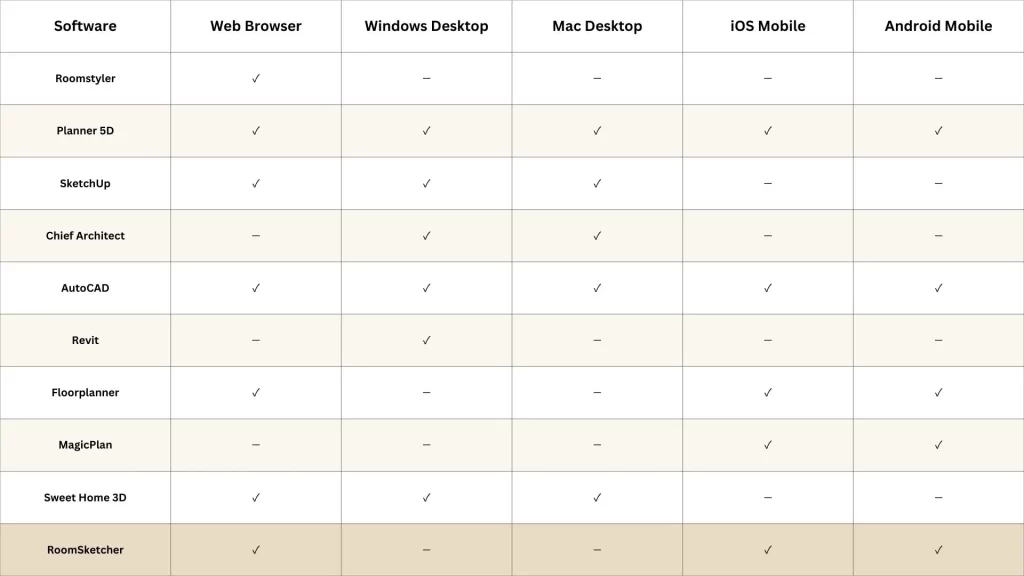
Professional architects, interior designers, and real estate developers require advanced 3D floor plan builders with capabilities extending far beyond basic room design. These platforms support complex workflows, precise specifications, and industry-standard outputs.
Essential Professional Features
Professional-grade 3D floor plan creators must include:
-
- Precise measurement tools with decimal accuracy
-
- Building code compliance checking and validation
-
- BIM (Building Information Modeling) integration
-
- Advanced rendering with customizable lighting and materials
-
- Construction documentation generation (elevations, sections, details)
-
- Import/export in professional formats (DWG, DXF, IFC, RVT)
-
- Material takeoffs and cost estimation
-
- Multi-story building support with complex geometry
Leading Professional Platforms
About 78% are known to use quality of photos, 92% on the description and 95% on photos to shortlist. Hence, the property is to be presented in the right light for attracting the big pool of tenants.
Chief Architect
Widely regarded as the best 3D floor plan software for residential design, Chief Architect offers comprehensive tools for home designers and builders. It generates construction documents automatically from 3D models, includes extensive material libraries, and provides photorealistic rendering capabilities.
AutoCAD Architecture
The industry standard for architectural drafting, AutoCAD Architecture combines powerful CAD tools with architectural-specific features. It’s ideal for professionals who need precise technical drawings alongside 3D visualization. Integration with other Autodesk products creates seamless workflows.
Revit
For large commercial projects, Revit’s BIM-centric approach enables collaborative design with real-time updates across all project views. Changes to the 3D model automatically update floor plans, elevations, and schedules—essential for complex projects with multiple team members.
ArchiCAD
Popular in Europe and gaining ground in North America, ArchiCAD provides an intuitive BIM environment with excellent 3D visualization. It’s known for its user-friendly interface compared to other professional platforms, making it accessible to smaller firms.
Investment Considerations
Professional 3D floor plan software represents significant investment, with annual subscriptions ranging from $1,500 to $5,000+ per user. However, the efficiency gains, professional output quality, and client satisfaction typically justify costs for established practices. Many vendors offer educational discounts and trial periods.
Mobile Apps for 3D Floor Planning
2# Perfect rent listing: Contacting the industry professionals can help the homeowner to prepare appropriate listing.
Mobile 3D floor plan apps bring design capabilities to smartphones and tablets, enabling on-site measurements, quick sketches, and client presentations anywhere. These tools complement desktop software rather than replacing it.
Advantages of Mobile Floor Plan Apps
-
- Measure rooms using phone camera and AR technology
-
- Create floor plans on-site during property visits
-
- Instantly share designs with clients via email or messaging
-
- Present 3D walkthroughs during client meetings
-
- Capture photos and integrate them into design projects
-
- Sync projects between mobile and desktop platforms
Top Mobile 3D Floor Plan Apps
MagicPlan
Uses AR scanning to automatically create floor plans by walking through a space. Simply point your camera at room corners, and the app generates accurate layouts. Popular with real estate agents and contractors for quick property documentation.
RoomScan Pro
Creates floor plans by touching your phone to walls around the room. The app calculates dimensions and generates plans within minutes. Excellent for property management and quick residential measurements.
Home Design 3D
Provides full design capabilities on mobile devices with an intuitive touch interface. Create complete floor plans, furnish rooms, and generate 3D renderings—all on your tablet or phone. Available for iOS and Android.
Planner 5D Mobile
Mobile version of the popular web platform, offering seamless sync between devices. Design on your phone during commutes, then refine on desktop. Features extensive furniture catalog and realistic rendering.
Understanding Mobile Limitations
While convenient, mobile 3D floor plan apps have constraints. Small screens make detailed work challenging, processing power limits complex rendering, and touch interfaces lack the precision of mouse and keyboard. Use mobile apps for initial concepts, measurements, and presentations, then transition to desktop software for detailed design work.
Software Comparison Chart
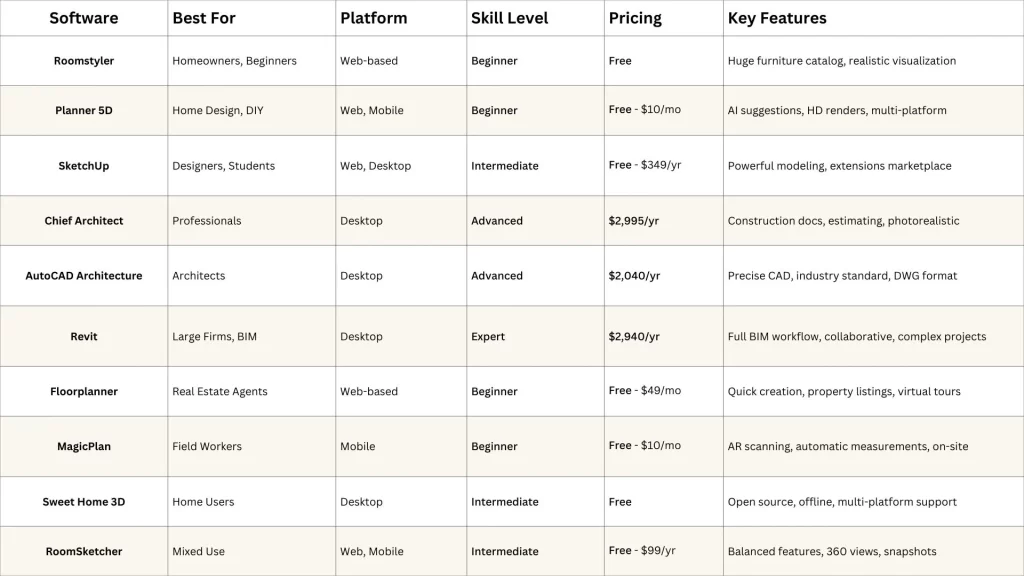
3# Tips for photos: There are available several online tools that can be used to crop and enhance photos to make them appear high quality. Professional photos are recommended for the listings that can be later re-used for re-lets in the future. This comparison helps you quickly identify the best 3D floor plan maker for your specific needs, budget, and skill level.
Making Your Decision
Choosing the best 3D floor plan maker depends on your specific situation. Consider these factors when making your selection:
-
- Project scope: One-time home renovation or ongoing professional work?
-
- Budget: What can you invest upfront and ongoing?
-
- Technical skill: How comfortable are you learning new software?
-
- Collaboration needs: Working solo or with teams?
-
- Platform preference: Mobile, desktop, or cloud-based?
-
- Output requirements: Casual visualization or construction-ready documents?
Quick Recommendations
For homeowners planning renovations: Start with Roomstyler or Planner 5D for free visualization, upgrading to paid versions if you need advanced features.
For real estate professionals: Floorplanner or MagicPlan offer the perfect balance of ease and professional results for property listings.
For interior designers: SketchUp Pro provides powerful modeling with manageable learning curve and extensive furniture resources.
For architects and builders: Chief Architect, AutoCAD Architecture, or Revit depending on project complexity and BIM requirements.
For students and hobbyists: Sweet Home 3D or SketchUp Free offer excellent capabilities without cost.
Also, Read: 3D Floor Plans for Houses | 3D House Floor Plans
Getting Started
Majority of the potential tenants prefer photos of the living area, bathroom, and the kitchen. A good number of landlords prefer to invest money on renovating or decorating their property. Hence, if advertisements are to be given out, then it will be necessary to check out if improvements will be required.
The 3D floor plan software landscape in 2026 offers exceptional options for every user level and budget. Most platforms provide free trials or freemium versions, allowing you to test before committing. Take advantage of these trial periods to find the 3D floor plan creator that feels intuitive and matches your workflow.
Start simple with basic room layouts, gradually exploring advanced features as you become comfortable. The best 3D floor plan maker is ultimately the one you’ll actually use consistently, so prioritize user experience alongside features. With the right tool, you’ll transform your space planning from guesswork into precise, visualized reality.
Whether you’re a homeowner reimagining your living space, a professional showcasing designs to clients, or an architect crafting detailed building plans, today’s 3D floor plan tools empower you to bring visions to life with unprecedented ease and accuracy.
For larger developments, 3D multi-family floor plans are ideal for presenting multiple units and shared spaces, while 3D senior living floor plans help highlight accessibility and amenities. Student accommodation projects can benefit from 3D student housing floor plans for clear visualization of layouts and facilities.
If you want to learn about the tools used to create these visuals, read this guide on best 3D floor plan software and tools.