
If you’ve ever looked at a strikingly realistic image of a house before it was even built, you’ve already seen 3D exterior rendering in action. But what is 3D exterior rendering, exactly – and why is every architect, designer, and real estate developer talking about it?
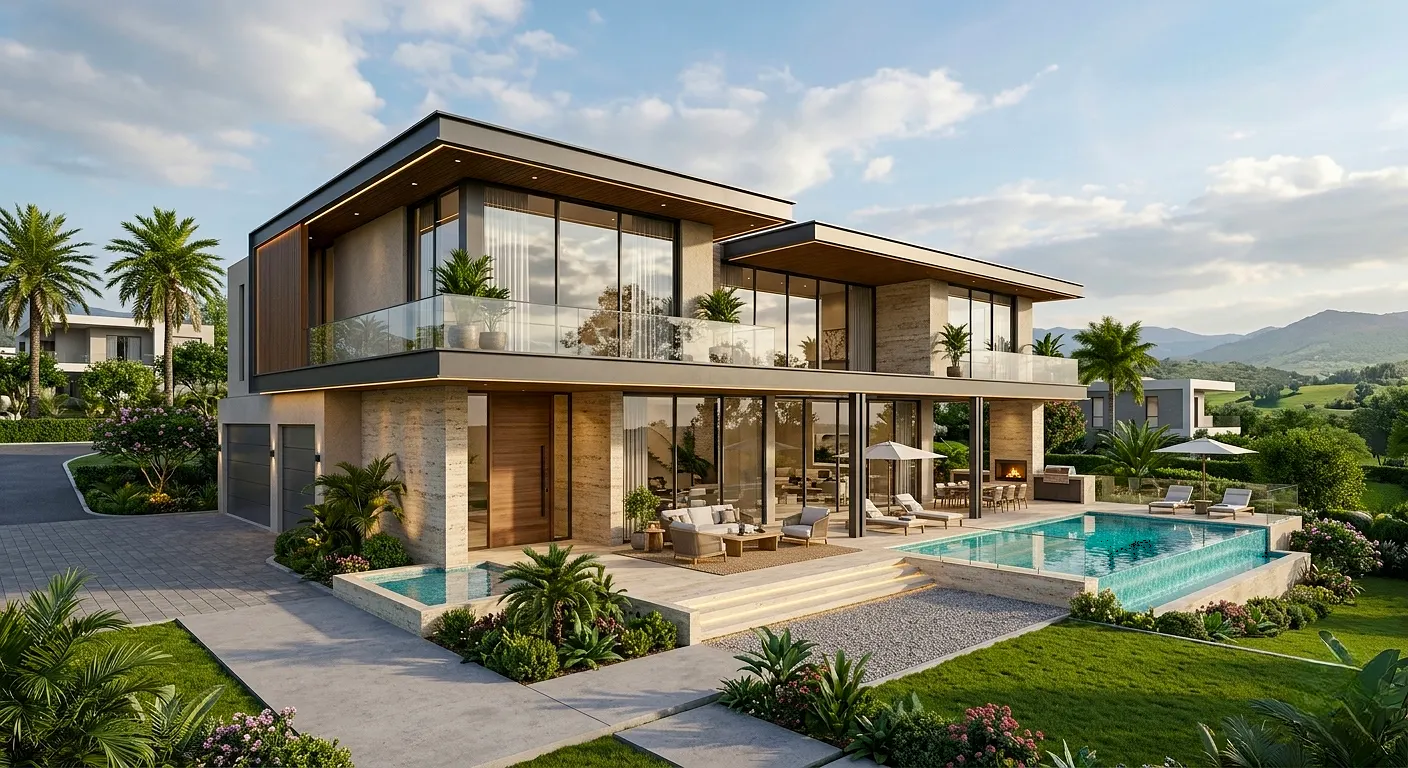
Simply put, 3D exterior rendering is the process of creating a photorealistic digital image of a building’s outside appearance using specialized 3D software. It transforms flat blueprints and 2D drawings into vivid, lifelike visuals that show exactly how a structure will look in the real world – complete with materials, lighting, landscaping, and surroundings.
Whether you’re a homeowner planning a renovation, an architect presenting a new project, or a developer trying to sell units off the plan, 3D exterior rendering is one of the most powerful tools available today. In this complete beginner’s guide, you’ll discover exactly how it works, why it matters, and how to get started.
Table of Contents
What is 3D Exterior Rendering? (Definition)
3D exterior rendering is a computer-generated visualization technique that produces photorealistic or stylized images of a building’s exterior. It uses 3D modeling software to build a virtual version of the structure, then applies lighting simulations, textures, and environmental effects to create a final image that closely resembles a real photograph.
Unlike a simple sketch or 2D elevation drawing, a 3D exterior render gives clients, stakeholders, and decision-makers a clear, accurate picture of what a finished building will look like — before a single brick is laid.
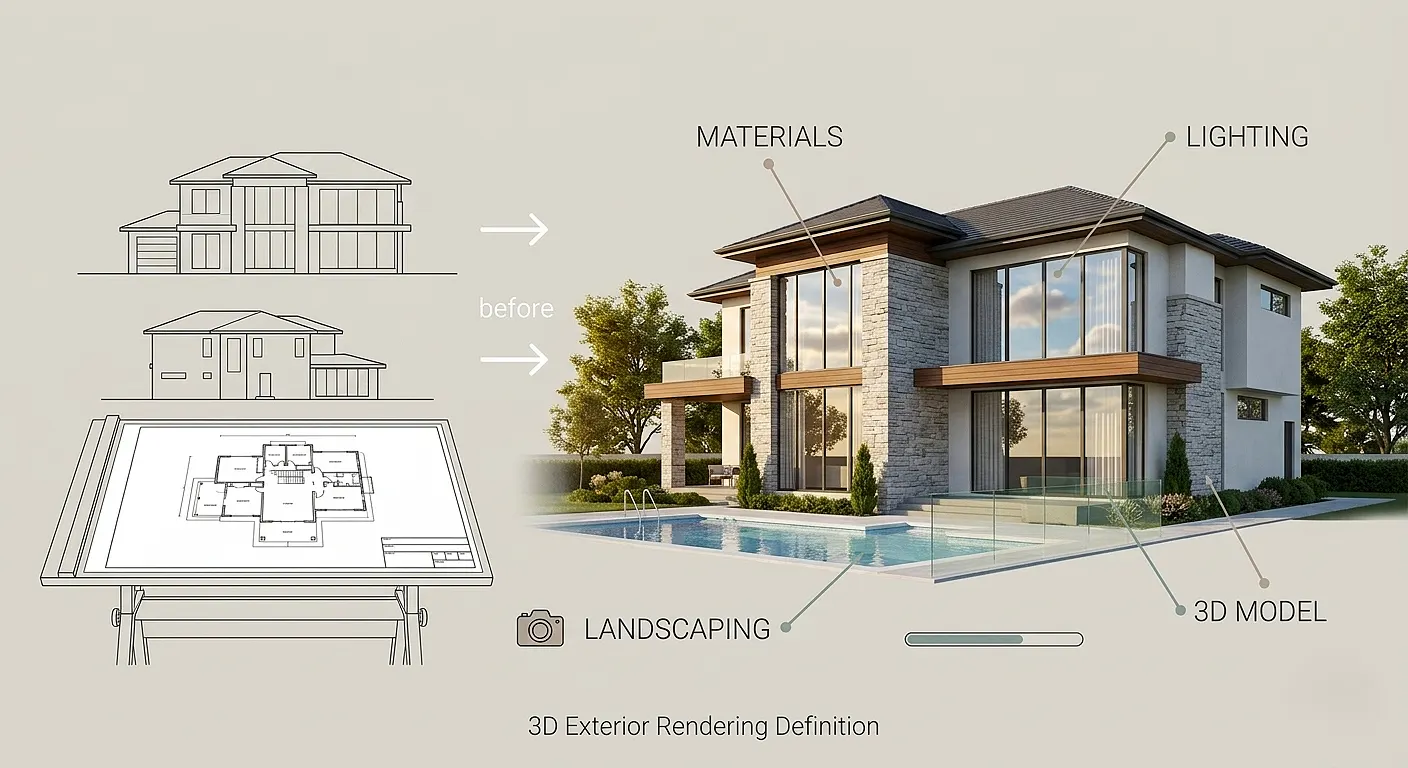
Quick Definition for Featured Snippet:
3D exterior rendering is the process of generating photorealistic digital images of a building’s exterior using 3D modeling and rendering software. It visualizes architecture, materials, landscaping, and lighting in a realistic way prior to construction.
How Does 3D Exterior Rendering Work?
Understanding the process helps you appreciate the skill and technology involved. Here is a step-by-step overview of how a typical 3D exterior render is produced:
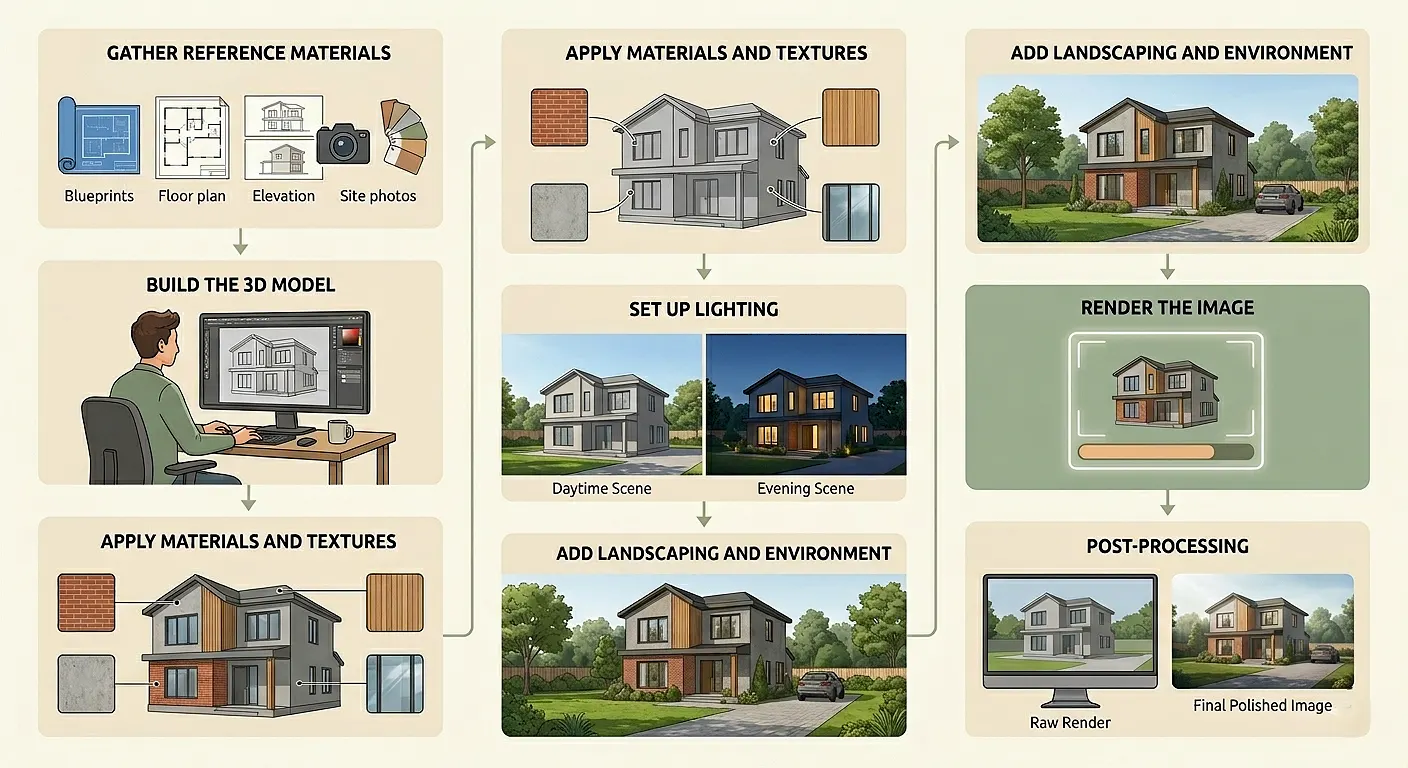
Step 1 – Gather Reference Materials
The process starts with collecting all available reference data. This typically includes:
- 2D architectural drawings or CAD files
- Floor plans and elevation drawings
- Material specifications and color palettes
- Site photographs and surrounding environment details
Step 2 – Build the 3D Model
Using professional software, a 3D artist constructs a precise digital model of the building. Every wall, roof angle, window frame, and structural detail is modeled to scale.
Step 3 – Apply Materials and Textures
Once the model is built, textures are applied to simulate real-world materials – brick, concrete, glass, wood, metal cladding, and more. High-resolution texture maps ensure the result looks convincingly realistic.
Step 4 – Set Up Lighting
Lighting is one of the most critical stages. Artists simulate natural sunlight, time of day, sky conditions, and ambient light to create depth and realism. Interior lights that glow through windows can also be added for evening scenes.
Step 5 – Add Landscaping and Environment
Trees, shrubs, grass, pathways, parked cars, and background scenery are added to ground the building in a believable context. This dramatically improves the realism and appeal of the final image.
Step 6 – Render the Image
The software processes all the 3D data – geometry, materials, lighting – and calculates the final image pixel by pixel. This stage is called “rendering” and can take anywhere from a few minutes to several hours depending on complexity and resolution.
Step 7 – Post-Processing
Final touches are applied in photo-editing software such as Adobe Photoshop. Colour grading, atmospheric haze, reflections, and other effects are refined to produce a polished, publication-ready image.
Types of 3D Exterior Rendering
Not all exterior renders look the same. Depending on the project’s goals and stage, different styles are used:
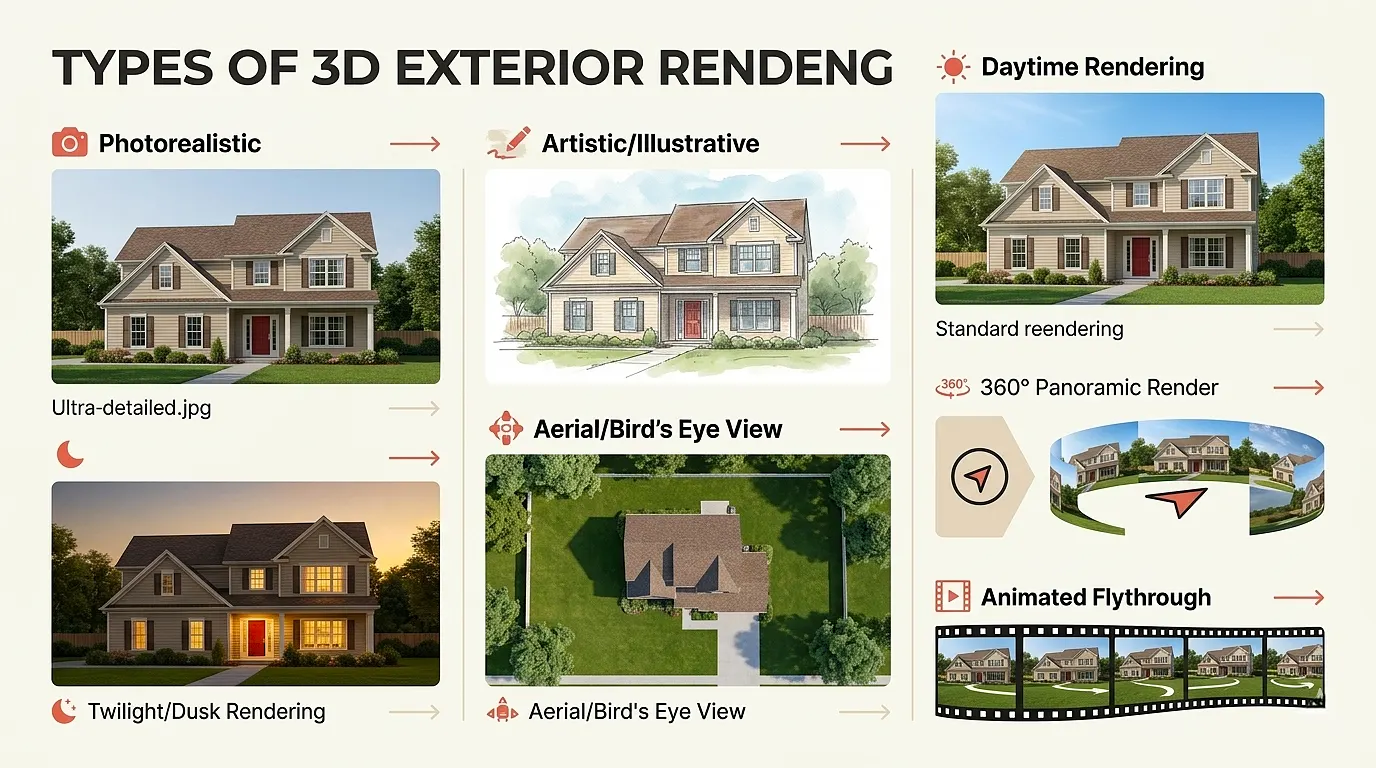
| Rendering Style | Description | Best Used For |
|---|---|---|
| Photorealistic | Mimics a real photograph with high detail | Client presentations, marketing, sales |
| Artistic/Illustrative | Painterly or sketch-like aesthetic | Concept design, creative proposals |
| Daytime Rendering | Natural sunlight, clear sky setting | Standard architectural presentations |
| Twilight/Dusk Rendering | Golden-hour or evening atmosphere | Luxury real estate marketing |
| Aerial/Bird’s Eye View | Top-down or drone-like perspective | Large developments, urban planning |
| 360° Panoramic Render | Interactive full-circle view | Virtual tours, immersive client experiences |
| Animated Flythrough | Video walkthrough of the exterior | High-end marketing, investor presentations |
Why is 3D Exterior Rendering Important?
The demand for high-quality exterior visualizations has grown exponentially. Here’s why so many professionals now consider 3D exterior rendering an essential part of their workflow:
1. Clients Can Visualize the Final Result
Traditional blueprints and technical drawings are difficult for non-architects to interpret. A photorealistic 3D render lets clients immediately understand what their project will look like, eliminating confusion and misaligned expectations.
2. Design Errors Are Caught Early
When a design is visualized in full 3D, proportion issues, material clashes, and aesthetic problems become immediately visible. Catching these errors before construction saves enormous amounts of time and money.
3. It Speeds Up Approvals
Planning authorities, HOA committees, and investors are far more likely to approve a project when they can see a realistic visualization. A compelling exterior render makes a powerful case without requiring a physical prototype.
4. It Drives Sales and Marketing
Real estate developers rely heavily on 3D exterior renderings to market properties that don’t yet exist. Realistic images attract buyers, generate leads, and support pre-sales before construction even begins.
5. Design Decisions Become Easier
Wondering whether to go with red brick or grey stone cladding? A 3D render lets you compare materials, colours, and finishes side by side – making design decisions faster and more confident.
3D Exterior Rendering vs. 2D Elevation Drawing: What’s the Difference?
Many beginners wonder how a 3D exterior render differs from a standard 2D elevation. Here’s a clear comparison:
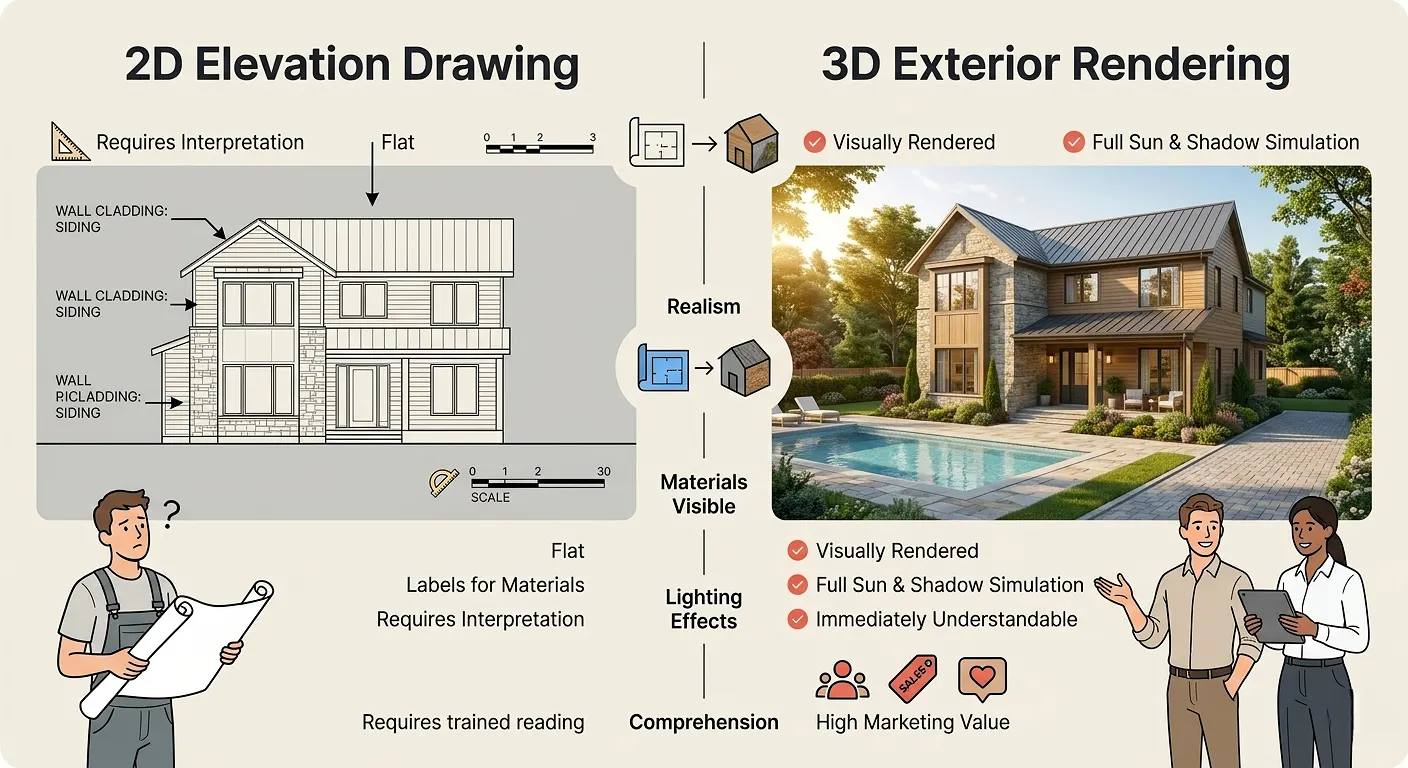
| Feature | 2D Elevation Drawing | 3D Exterior Rendering |
|---|---|---|
| Realism | Flat, line-based | Photorealistic |
| Materials visible | Labelled only | Visually rendered |
| Lighting effects | None | Full sun/shadow simulation |
| Landscaping | Minimal or absent | Fully detailed |
| Client comprehension | Requires training to read | Immediately understandable |
| Marketing value | Low | Very high |
| Revision flexibility | Limited | Easy to update |
If you want to understand this distinction more deeply, learn how to convert 2D elevation to 3D exterior rendering and see the dramatic transformation for yourself.
What Software is Used for 3D Exterior Rendering?
Several professional-grade tools power the world of exterior architectural visualization. According to Autodesk, software like 3ds Max remains one of the most widely used platforms in architectural visualization globally.
Here are the most commonly used tools:
- 3ds Max + V-Ray or Corona Renderer – Industry standard for high-end photorealistic renders
- SketchUp + Enscape or Lumion – Popular for real-time rendering and quick walkthroughs
- Blender – Powerful open-source option with Cycles or EEVEE render engines
- Revit + Enscape – Preferred in BIM-heavy workflows
- Lumion – Known for fast rendering and excellent landscaping tools
- Rhino + V-Ray – Common in complex parametric design workflows
- Unreal Engine – Increasingly used for ultra-realistic real-time visualization
Want a deeper comparison? Explore our detailed breakdown of the best 3D exterior rendering software options available today.
3D Exterior Rendering for Homes: What Homeowners Need to Know
Homeowners are increasingly commissioning exterior renders for renovation projects, new builds, and even landscaping redesigns. Here’s what you should know before getting started:
What Can Be Rendered?
Almost anything related to a home’s exterior can be visualized:
- Full house exterior from multiple angles
- Garage and driveway design
- Garden, pool, and outdoor living areas
- Fence, gate, and boundary treatments
- Lighting for evening ambience
- Seasonal variations (summer, autumn, winter)
How Accurate is It?
A well-produced exterior render is extremely accurate when based on correct measurements and specifications. The 3D model is built to scale, so proportions are precise. Material colours may vary slightly in real life due to screen calibration, but a professional renderer will account for this.
How Long Does It Take?
Typical turnaround times vary by complexity:
- Simple residential render: 2–4 business days
- Complex multi-angle residential project: 5–7 business days
- Large commercial or multi-unit development: 1–3 weeks
If you’re looking for a streamlined, professional service, explore how 3D exterior home design is made easy with the right team behind you.
Key Benefits of 3D Exterior Rendering
To summarize the value clearly, here are the core benefits:
- Better communication between designers, clients, and contractors
- Faster decision-making on materials, colours, and design choices
- Reduced construction errors by resolving design issues early
- Stronger marketing materials for real estate sales and development
- Professional presentations for planning applications and investor pitches
- Increased client confidence and satisfaction throughout the project
- Cost savings by avoiding expensive late-stage design changes
According to the National Association of Realtors, properties marketed with high-quality visuals consistently sell faster and at better prices than those without – making exterior rendering a measurable business investment.
Common Mistakes Beginners Make With 3D Exterior Rendering
If you’re new to commissioning or creating exterior renders, avoid these frequent pitfalls:
Mistake 1 – Providing Inaccurate or Incomplete Drawings
The quality of a render depends entirely on the accuracy of the input data. Blurry photos or rough sketches produce poor results. Always provide detailed, dimensioned drawings or CAD files.
Mistake 2 – Ignoring Lighting Conditions
Many beginners overlook the importance of specifying a time of day and season. A midday summer render looks very different from a twilight winter scene. Be specific about the atmosphere you want.
Mistake 3 – Choosing Unrealistic Materials
Just because a material looks great in a 3D model doesn’t mean it’s available or practical. Always cross-reference your render materials with real-world products.
Mistake 4 – Skipping Multiple Viewpoints
A single render from one angle rarely tells the full story. Commission at least three to four views — front, rear, side, and an aerial – to capture the complete design.
Mistake 5 – Not Reviewing Drafts Carefully
Always review the draft render thoroughly before approving the final version. Check proportions, window placements, material colours, and landscaping details carefully.
Mistake 6 – Underestimating the Budget
Cheap renders often look cheap. Professional-quality exterior visualization requires skilled artists and proper software. Invest appropriately to get results that truly represent your project.
Expert Tips for Getting the Best 3D Exterior Renders
These insights come from experienced architectural visualization professionals:
Tip 1 – Provide a Mood Board Share reference images showing the style, atmosphere, and material palette you’re aiming for. A mood board dramatically improves the first-draft quality.
Tip 2 – Specify Camera Angles in Advance Decide upfront which views are most important – street-level front view, garden perspective, aerial overview. This saves revision rounds.
Tip 3 – Think About Context A building doesn’t exist in isolation. Ask your renderer to include realistic surroundings – neighbouring buildings, street furniture, mature trees – to make the image more convincing.
Tip 4 – Request Both Day and Twilight Versions Many clients find that a daytime render works for planning purposes while a twilight render excels for marketing. Getting both maximizes the value of your investment.
Tip 5 – Use High-Resolution Output Always request renders at a minimum of 300 DPI for print use and at least 3000px wide for digital use. Low-resolution renders look unprofessional in presentations or brochures.
Tip 6 – Plan for Revisions Even with perfect briefing, revisions are part of the process. Most professional studios include two to three revision rounds in their pricing. Plan for this in your timeline.
How Much Does 3D Exterior Rendering Cost?
Pricing varies widely depending on project complexity, number of views, and the studio’s experience level. Here’s a general guide:
| Project Type | Approximate Price Range |
|---|---|
| Simple residential (1 view) | $150 – $400 |
| Residential (3–4 views) | $400 – $1,200 |
| Luxury residential (full package) | $1,200 – $3,000+ |
| Small commercial building | $800 – $2,500 |
| Large commercial/multi-unit | $2,500 – $10,000+ |
| Animation/flythrough | $2,000 – $15,000+ |
Note: Prices are indicative and vary by studio, location, and project requirements.
For transparent, competitive pricing tailored to your project, visit our 3D exterior rendering pricing page to explore available packages.
3D Exterior Rendering in Architecture and Real Estate: Industry Applications
The use of 3D exterior rendering spans many professional disciplines. Here’s how different industries apply this technology:
Architecture and Design
Architects use exterior renders throughout the design process – from concept validation in early stages to polished presentation visuals for client approval. Renders are also submitted alongside planning applications to help approval boards visualize proposed developments.
Real Estate Development
Developers market off-plan properties using exterior renders before construction begins. This enables pre-sales, funding presentations, and website listings that generate real buyer interest months or years ahead of completion.
Interior Design and Landscaping
Landscape architects and exterior designers use renders to present garden layouts, outdoor living spaces, pool designs, and driveway treatments in a compelling, client-friendly format.
Construction and Building Companies
Builders use renders to confirm scope with clients, present options to homeowners, and support tender submissions that require visual evidence of the proposed outcome.
Urban Planning and Government
City planners and government agencies increasingly require 3D visualizations for major development proposals, infrastructure projects, and urban regeneration schemes, as noted by the American Institute of Architects.
What is 3D Exterior Rendering
Now that you understand what is 3D exterior rendering, it’s clear why this technology has become indispensable across architecture, real estate, and construction. It bridges the gap between a design on paper and a convincing visual reality – helping clients understand projects faster, enabling smarter design decisions, and driving stronger marketing outcomes.
Whether you’re commissioning your first render or exploring ways to upgrade your current visualization workflow, the key is to work with experienced professionals who understand both the technical and creative demands of high-quality exterior imagery.
Ready to see what your project could look like? Discover how 3D exterior home design is made easy with the right expertise, or get a detailed quote on our 3D exterior rendering pricing page.
Frequently Asked Questions (FAQ)
What is 3D exterior rendering used for?
3D exterior rendering is used to create photorealistic images of a building’s outside appearance before it is built or renovated. It is widely used in architecture, real estate marketing, construction planning, landscape design, and planning authority submissions.
What is the difference between 3D rendering and 3D modelling?
3D modelling refers to creating the digital three-dimensional structure of an object or building. 3D rendering is the final step where that model is processed with lighting, textures, and environmental effects to produce a realistic image. Modelling builds the scene; rendering produces the final visual output.
How accurate is a 3D exterior rendering?
When based on accurate architectural drawings and specifications, a 3D exterior rendering is highly precise in terms of proportions, scale, and layout. Material colours and finishes may differ slightly from real life due to monitor calibration or manufacturing tolerances, but professional renderers account for this carefully.
What is 3D exterior rendering software commonly used by professionals?
Popular professional tools include 3ds Max with V-Ray or Corona Renderer, SketchUp with Lumion or Enscape, Blender, Revit, and Unreal Engine. The choice depends on the studio’s workflow and the project’s complexity. Explore a full comparison on our 3D exterior rendering software guide.
How long does it take to produce a 3D exterior render?
Simple residential renders typically take two to four business days. More complex multi-view or commercial projects may take one to three weeks. Turnaround time depends on the studio’s workload, the project’s complexity, and the number of revision rounds required.
How much does 3D exterior rendering cost?
Prices generally range from around $150 for a basic single-view residential render to several thousand dollars for complex commercial projects or animated flythroughs. Visit our 3D exterior rendering pricing page for specific package details.
Can I get a 3D exterior render from just a photo of my house?
Yes, in many cases a professional studio can produce an exterior render using clear photographs of an existing property, especially for renovation or addition projects. Accurate measurements are still required for a precise result.
What is 3D exterior rendering in real estate?
In real estate, 3D exterior rendering is used to market properties – especially new developments – before they are built. Developers use these visuals on websites, brochures, social media, and in investor presentations to generate pre-sales and buyer interest ahead of construction completion.
3D Exterior Rendering Services | The 2D3D Floor Plan Company