
In this blog guide, we will explain the in-depth details of 3D floor plans, what they are, their benefits, types, uses, advantages, etc. Planning to buy a new home or redesign your current space? Understanding 3D floor plans can transform how you visualize and plan your dream property. This comprehensive guide explains everything you need to know about 3D floor plans, from basics to professional applications.
Table of Contents
What is a 3D Floor Plan?
3D floor plans play a great role in converting online visitors into prospective buyers. These are well-scaled 3D floor plan renderings that show the top view of the property so that viewers can identify the room spacing and plot management plan with ease.
Definition and Overview
A 3D floor plan is a three-dimensional visual representation of a property’s layout that shows rooms, furniture, fixtures, and spatial relationships from a realistic perspective. Unlike traditional flat drawings, a three d floor plan gives you a bird’s-eye view with depth, height, and width dimensions.
Think of it as a dollhouse view of your property where you can see:
- Complete room layouts with accurate measurements
- Furniture placement and scale
- Wall heights and ceiling details
- Textures, colors, and materials
- Lighting and shadow effects
- Interior design elements
Key Features:
- Realistic three-dimensional perspective
- Accurate spatial representation
- Detailed interior elements
- Easy-to-understand visual format
- Interactive viewing options (in digital versions)
Also, Read: Why 3D Floor Plans Are the Game-Changer Every Real Estate Pro Needs?
Why 3D Floor Plans Matter?
3D floor plans help to communicate the actual flow of the property. From the past few years, the idea to evaluate property from floor plans is on the boost due to the advanced 3D design arrangements. These 3D designs can show the exact look of the property so that buyers can have an exact idea about what they are going to buy.
- Buyers evaluating under-construction properties
- Architects presenting design concepts
- Interior designers planning renovations
- Real estate developers marketing projects
- Homeowners planning extensions or remodeling
The visual clarity helps bridge the gap between technical drawings and actual space, making property decisions easier for everyone involved.
3D vs 2D Floor Plans: Key Differences
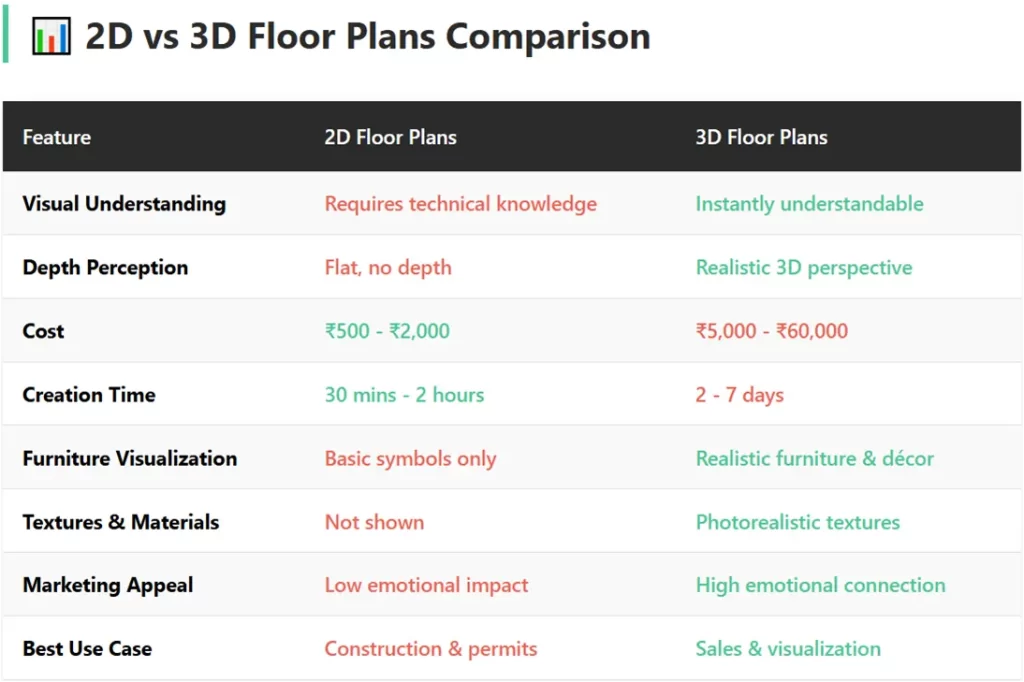
Understanding the distinction between 2D and 3D floorplans helps you choose the right tool for your needs. You can make your property listing eye-catching and outstanding by using 2D or 3D floor plans. Floor plans are considered an essential marketing tool that can make your property listing stand out from the competitors.
2D Floor Plans
What They Are: Flat, blueprint-style drawings showing layout from directly above
Property buyers can easily check the layout and internal spaces by seeing 2D floor plans. It will help them to make up their mind about the usability of space. How internal areas are connected to each other? how much size and areas are included? etc.
Advantages:
- Simple and quick to create
- Lower production costs
- Easy to print and share
- Familiar to architects and engineers
- Show precise measurements clearly
Limitations:
- Require technical knowledge to interpret
- No depth perception
- Difficult for non-professionals to visualize
- Cannot show height variations
- Limited emotional appeal
3D Floor Plans
What They Are: Three-dimensional visualizations showing realistic spatial depth
Here we can understand the real estate photos are not enough, in this case, 3D floor plans help them to understand the internal layout more clearly. A recent study shows that we can increase click-throughs up to 65% by using 3D floor plans in real estate listings.
Advantages:
- Instantly understandable for anyone
- Show realistic room proportions
- Display furniture and décor in context
- Create emotional connections
- Reveal design flaws before construction
- Better for marketing and presentations
- Can include textures and materials
Limitations:
- Higher production costs
- Require specialized software or services
- More time-consuming to create
- Larger file sizes for digital versions
Which One Should You Choose?
Use 2D floor plans when:
- Working with contractors on technical specifications
- Obtaining building permits
- Making precise structural calculations
- Budget is extremely limited
Use 3D floor plans when:
- Selling or marketing properties
- Helping clients visualize designs
- Planning interior layouts
- Making renovation decisions
- Presenting to non-technical stakeholders
For most residential projects in India, combining both formats gives the best results – 2D for technical work and 3D for visualization and decision-making.
Also, Read: Difference Between 2D Floor Plans and 3D Floor Plans (2D vs 3D Plans)
Benefits of 3D Floor Plans for Homeowners and Professionals
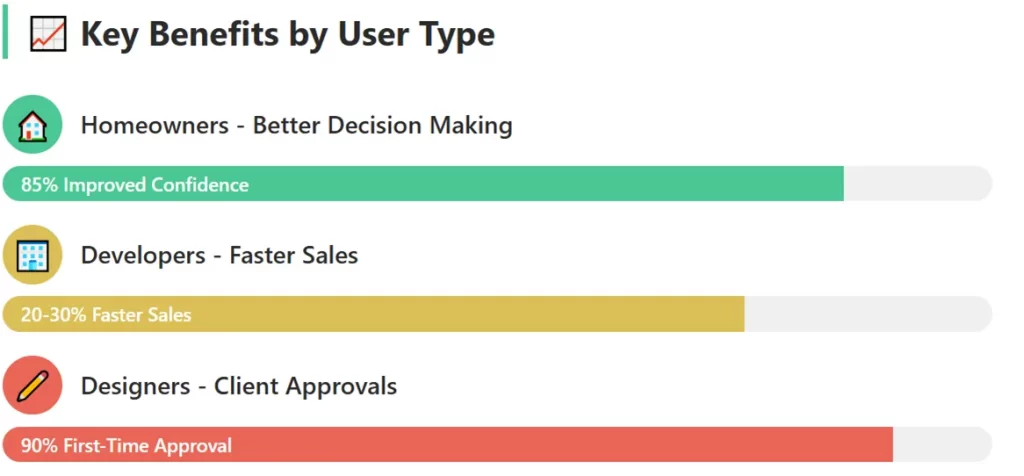
3D Floor Plans for Homeowners
You can try to draw estimated floor plans from scratch or can take professional’s help to get 2D or 3D Floor Plans to highlight the actual flow of the property.
- Better Visualization: You can see exactly how your 1200 sq ft apartment will look before construction begins. This eliminates guesswork and buyer’s remorse.
- Informed Decision-Making: Compare different layouts, furniture arrangements, and design options side-by-side to make confident choices.
- Space Optimization: Identify wasted space and optimize room layouts for Indian homes where every square foot matters.
- Furniture Planning: Check if your existing furniture fits the new home or plan purchases with accurate dimensions.
- Family Alignment: Help all family members understand and agree on the design—crucial when multiple generations live together.
- Cost Savings: Catch design mistakes early before expensive construction begins. Moving a wall on screen costs nothing; moving it after construction costs lakhs.
3D Floor Plans for Real Estate Developers
The process of creating 3D floor plans is actually quite complex, although there are some tools where the drag and drop tools assist in the easy drawing so that floor plans can be updated with ease. But, for Real Estate Developers, these 3D floor plans are very basic, no realism, no detailing for colors, etc. Only professionally created 3D floor plans (using software like 3dsMax, V-ray), etc., must be priority.
- Faster Sales Cycles: Properties with 3d floor plans sell 20-30% faster than those with only photographs or 2D drawings
- Higher Price Realization: Buyers are willing to pay premium prices when they can clearly visualize the space
- Reduced Site Visits: Pre-qualify buyers online, saving time for both parties
- Better Marketing Materials: Stand out in property portals
- Virtual Property Shows: Sell under-construction properties effectively without completed units
3D Floor Plans for Architects and Interior Designers
For architect and interior designers, 3D floor plans are very important and crucial. Our advanced combinations of software tools allow us to make the 3D rendering designs fabulous and great looking. Our expertise provides highly precise guidelines and dimensioning details so that buyers can find an exact idea about the whole area .
- Client Communication: Eliminate misunderstandings by showing exactly what the final design will look like
- Design Exploration: Test multiple concepts quickly and get client approval faster
- Professional Credibility: Modern 3D presentations demonstrate technical competence and creativity
- Competitive Advantage: Win more projects by presenting compelling visual proposals
- Reduced Revisions: Clients understand the design upfront, reducing costly mid-project changes
3D Floor Plans for Interior Designers
3D floor plans can be customized by adding floors, ceiling materials, colors and finishes. Interior designers can ask us to add best finishing choices and match the colors of paints as per their dream house décor.
- Accurate Material Selection: Show how different flooring, wall colors, and furnishings work together before purchasing
- Lighting Planning: Visualize natural and artificial lighting effects throughout the day.
- Furniture Layouts: Test different arrangements without physically moving heavy furniture.
- Client Approvals: Get sign-offs on complete designs, reducing disputes during execution.
Common Applications: Real Estate, Architecture, Interior Design
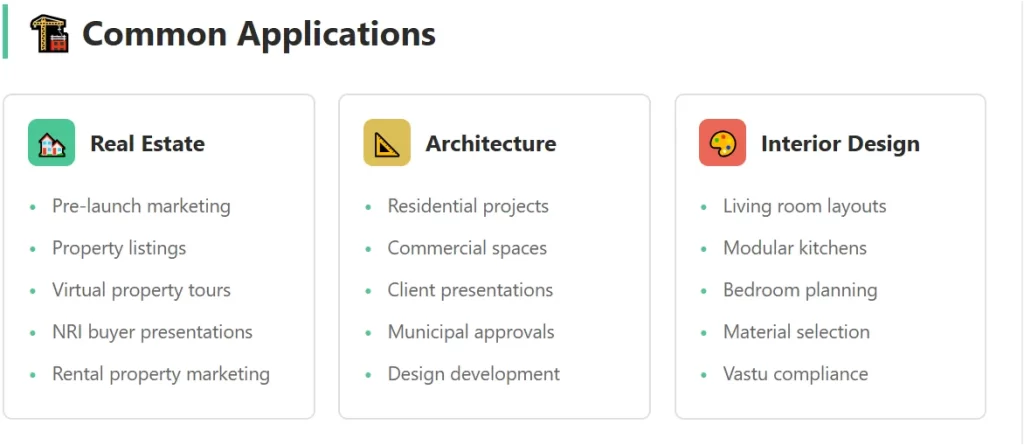
If we talk about the common applications of 3D floor plans, then these are used in the multiple industries. You can furnish the interior areas with different colors and custom finishes. Details like room names, sizes, and exact measurements can be added to the 3D floor plans.
3D Floor Plans for Real Estate Industry
In this section, we will discuss about the uses and applications of 3D floor plans in Real Estate industry.
Pre-Launch Marketing
Developers in New York, Los Angeles, Chicago, Miami, and other major metropolitan areas use 3D floor plans to generate pre-launch bookings before construction begins.
Property Listings
Online portals display 3D layouts alongside photographs, giving buyers complete information.
Virtual Tours
Combine 3D floor plans with 360-degree virtual tours for out-of-state buyers or international investors.
Comparison Tools
Help buyers compare different units in the same building—one-bedroom vs. two-bedroom, corner units vs. interior units.
Rental Properties
Landlords use 3D plans to attract quality tenants and justify premium rents.
3D Floor Plans for Architectural Applications
For architects, both types of floor plans, 2D floor plans and 3D floor plans, are important. 2D floor plans help them to build and construct houses accurately and 3D floor plans help them to visualize the actual finished homes even before constructing them.
Residential Projects
- Single-family homes and luxury estates
- Apartment and condominium complexes
- Renovations and additions
- Historic building restorations
Commercial Projects
- Office space planning
- Retail store layouts
- Restaurant and café designs
- Showroom configurations
Client Presentations
Architects present design concepts to clients, municipal authorities, and investors.
Design Development
Test different architectural solutions before finalizing construction documents.
Building Approvals
Some municipal building departments now accept 3D visualizations along with 2D drawings for better clarity.
3D Floor Plans for Interior Design Applications
Residential Interiors
- Living room layouts
- Custom kitchen designs
- Bedroom and closet planning
- Bathroom configurations
- Home office setups
- Multi-purpose rooms
Commercial Interiors
- Office workspace planning
- Retail store visual merchandising
- Hotel room layouts
- Restaurant seating arrangements
Space Planning
Optimize furniture placement for functionality and flow while maximizing square footage.
Material and Color Selection
Visualize how different materials, colors, and textures work together in various lighting conditions.
Contractor Coordination
Share accurate layouts with contractors, electricians, plumbers, and other tradespeople.
Other Applications of 3D Floor Plans
In this 3D Floor Plans guide, we are discussing about the applications of 3D floor plans. The below mentioned applications are additional uses for 3D floor plans.
Space Planning
Optimize furniture placement for functionality and flow while maximizing square footage.
Material and Color Selection
Visualize how different materials, colors, and textures work together in various lighting conditions.
Contractor Coordination
Share accurate layouts with contractors, electricians, plumbers, and other tradespeople.
Also, Read: How Floor Plans are Important for Real Estate Agents?
How 3D Floor Plans Are Created
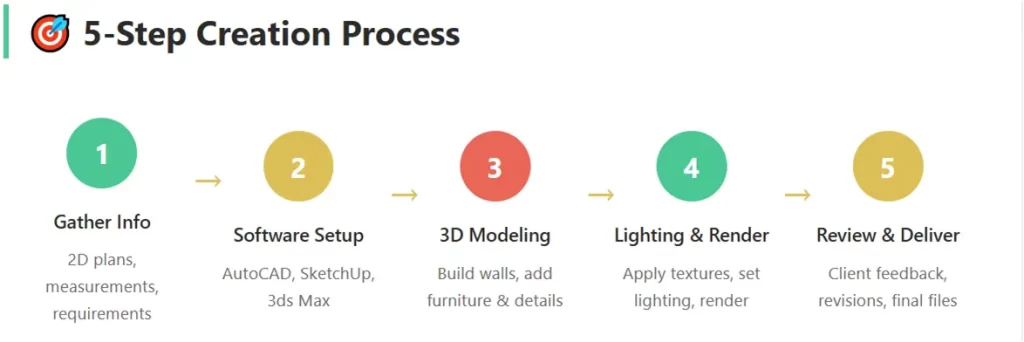
Understanding the creation process helps you appreciate the work involved and communicate better with service providers.
Step 1: Gathering Information
For creating 3D floor plans, first requirement is to gather all important information about the layout, accurate measurements, internal layouts, etc.
Required Inputs:
- 2D architectural drawings or floor plans
- Exact measurements and dimensions
- Room heights and ceiling details
- Door and window specifications
- Electrical and plumbing points
- Any specific design requirements
For Existing Properties:
Physical measurements using laser measuring tools or manual measurement tapes.
Step 2: Software Selection
Second requirement is to understand the need of software type, for example, if someone needs a basic 3D floor plan rendering (with limited customization, less detailed, less realism look and feel), then they can select SketchUp software,. If someone wants high-quality rendering, detailed colors and finishes, then we should use software combination like 3dsMax for 3D modeling and V-ray for 3D rendering.
Professional Software Options:
- AutoCAD: Industry-standard for architectural drawings
- SketchUp: User-friendly 3D modeling tool
- Revit: Building Information Modeling (BIM) software
- 3ds Max: Advanced visualization and rendering
- Blender: Free, open-source 3D creation suite
- Chief Architect: Specialized home design software
- Planner 5D: Easy-to-use online tool
- RoomSketcher: Quick floor plan creation
Most Indian professionals use AutoCAD for base drawings and SketchUp or 3ds Max for 3D visualization.
Step 3: Creating the 3D Model
In the section, we will be discussing about the 3D model creation, which is a need of every 3D floor plan creation.
Base Structure:
- Import 2D floor plan as reference
- Build walls with accurate heights
- Add doors and windows
- Create ceiling and flooring
Interior Elements:
- Place furniture and fixtures
- Add kitchen cabinets and appliances
- Include bathroom fittings
- Position lighting fixtures
- Add decorative elements
Details:
- Apply textures (wood, marble, tiles)
- Set material properties
- Add colors according to design scheme
- Include small details (switches, handles, décor items)
Step 4: Lighting and Rendering
This is an important step for 3D floor plan creation, where we simply do the main core work of 3D floor plans.
Lighting Setup:
- Natural light from windows
- Artificial lighting (ceiling lights, lamps, LED strips)
- Ambient lighting for overall brightness
- Shadow calculations for realism
Rendering:
Converting the 3D model into photorealistic images using rendering engines. This process can take minutes to hours depending on quality and complexity.
Output Formats:
- High-resolution images (JPEG, PNG)
- PDF documents
- Interactive 3D models
- Virtual reality-ready files
- Video walkthroughs
Step 5: Review and Revisions
This is the last step of creating 3D floor plans, and this is important one to consider.
- Client Review:
- Share initial renderings for feedback on layout, colors, furniture, and overall design.
- Modifications:
- Make requested changes -swap furniture, change colors, adjust layouts.
- Final Approval:
- Deliver final high-quality renderings once client approves.
DIY vs Professional Creation
This is a crucial question, both options ae good, only depends on the need and expertise of the person. A non-technical (who does not understand the architecture AND no prior experience of that particular tool or software) can not create 3D floor plan. Mostly people consider using the professional 3D floor plan services to create 3D floor plans.
DIY Approach:
Best For: Simple personal projects, learning purposes
Pros:
- Cost-effective (free to low-cost tools available)
- Complete creative control
- Learn valuable skills
Cons:
- Steep learning curve
- Time-consuming
- May lack professional polish
- Limited advanced features in free software
Professional Services:
Best For: Marketing materials, client presentations, complex projects
Pros:
- High-quality, photorealistic results
- Quick turnaround times
- Professional expertise
- Multiple revision options included
Cons:
- Higher costs
- Dependence on service provider
- Communication required for revisions
Also, Read: Creating Floor Plan Illustrations using Adobe Illustrator
Cost Considerations and ROI
3D floor plan costs or pricing is an important consideration before going for the actual project. Understanding pricing helps you budget effectively and evaluate return on investment.
Pricing Factors
Project Complexity:
- Number of rooms (studio vs 4-bedroom)
- Level of detail required
- Custom furniture vs standard items
- Landscaping and exterior elements
Quality Level:
- Basic visualization: Simple colors and basic furniture
- Standard quality: Good textures, realistic lighting
- Photorealistic: High-end rendering, detailed textures
- VR-ready: Interactive, virtual reality compatible
Turnaround Time: Rush projects (24-48 hours) cost 50-100% more than standard timelines (5-7 days).
Revisions Included: Most services include 2-3 revision rounds; additional changes cost extra.
U.S. Market Pricing (2024-2026)
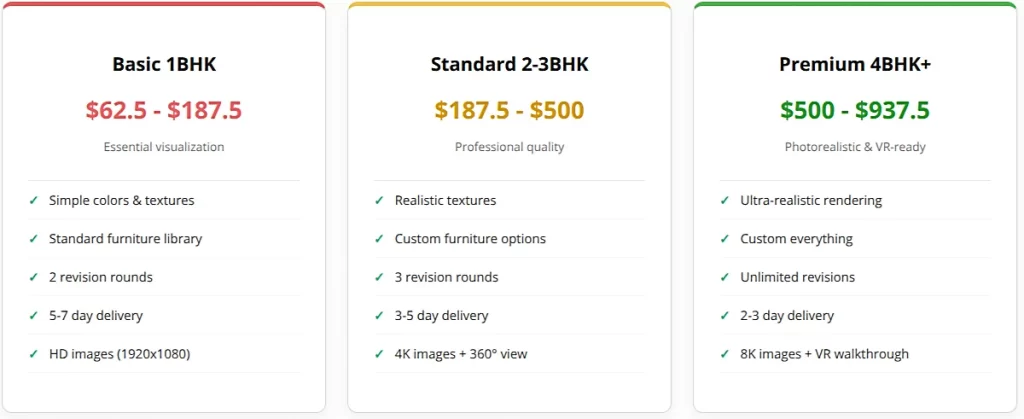
Freelancers and Small Studios:
- Basic 3D floor plan: $75 – $150 per room
- Standard quality: $150 – $300 per room
- Photorealistic: $300 – $600 per room
Complete Apartments/Homes:
- Studio/1-bedroom: $300 – $800
- 2-bedroom: $500 – $1,500
- 3-bedroom: $800 – $2,500
- 4-bedroom+: $1,500 – $4,000+
Premium Agencies:
- Can charge 50-100% more for brand value
- Often package with other services (photography, virtual tours)
- Include project management and customer service
Additional Services:
- Virtual staging: $100 – $300 per room
- 360-degree virtual tour: $500 – $1,500
- Video walkthrough: $800 – $3,000
- VR-ready models: $1,000 – $5,000
Return on Investment
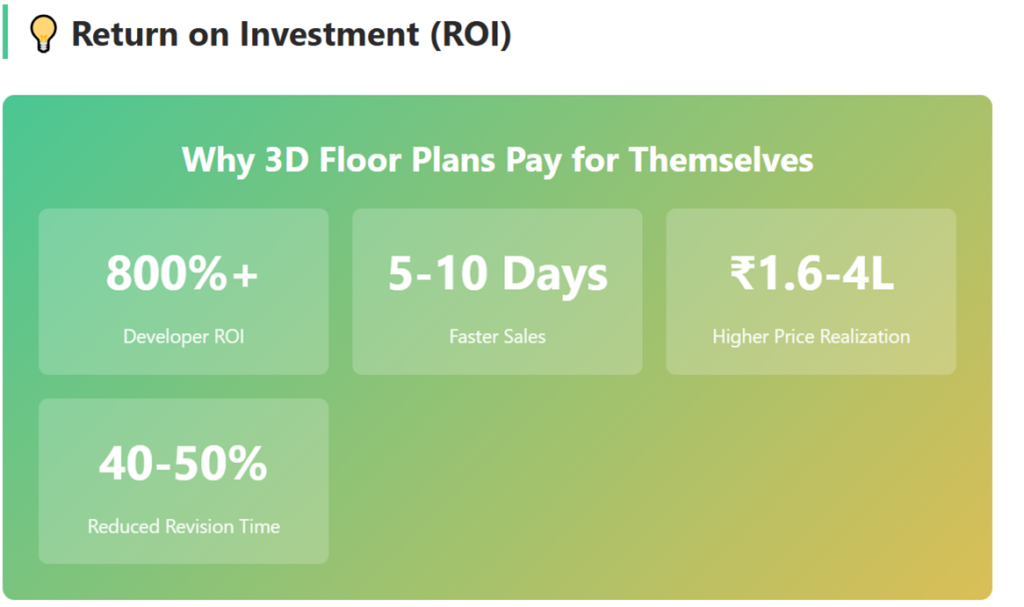
For Real Estate DevFor Real Estate Developers:
Investment: $1,200 for 3-bedroom floor plan
Returns:
- Sell 5-10 days faster = reduced interest costs on construction loans
- 2-5% higher price realization on $500,000 property = $10,000-$25,000 additional revenue
- Reduced marketing costs through better online conversions
- Fewer site visits = sales team efficiency
ROI: 800-2000% return on investment
For Homeowners:
Investment: $900 for renovation planning
Returns:
- Avoid $3,000-$12,000 in renovation mistakes
- Optimize space to avoid $5,000-$15,000 in additional furniture costs
- Reduce contractor disputes and rework costs
- Increase property value through better design
ROI: 300-1300% cost savings
For Interior Designers:
Investment: $600-$2,000 per project for 3D visualization
Returns:
- Win 30-40% more client projects
- Charge 15-25% premium for visual presentations
- Reduce revision time by 40-50%
- Improve client satisfaction and referrals
ROI: Project win rate improvement alone justifies investment
Budget Optimization Tips
Start Small: Get 3D plans for key rooms only (living room, master bedroom) rather than the entire house.
Bundle Services: Many providers offer discounts when you combine multiple rooms or services.
Use Standard Elements: Custom furniture modeling costs more; use standard furniture libraries when possible.
Plan Revisions: Finalize your requirements before starting to minimize costly revision rounds.
Compare Quotes: Get proposals from 3-4 service providers to understand market rates.
Consider Long-term Value: Investing in high-quality 3D plans once is better than redoing cheap work multiple times.
Choosing the Right 3D Floor Plan Service
Also, Read: 3D Floor Plan Price/ Cost Details | Unbeatable Lowest Pricing
Choosing the Right 3D Floor Plan Service
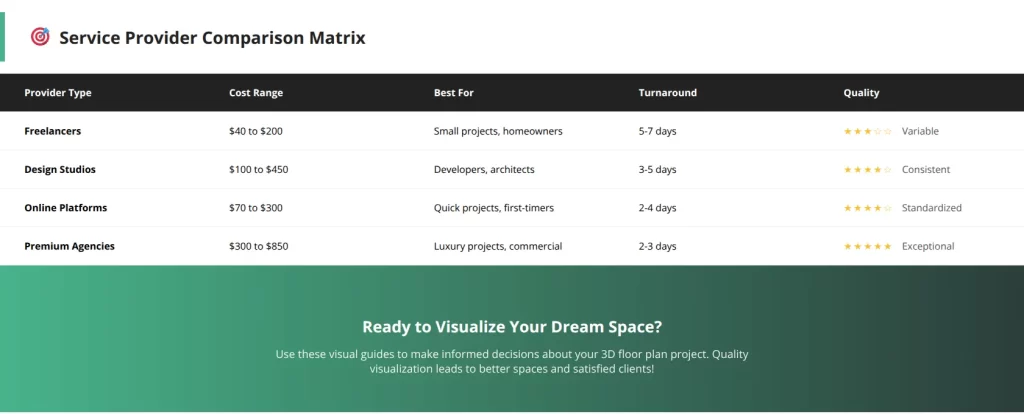
Selecting the right service provider ensures quality results and smooth collaboration.
Types of Service Providers
Freelance Designers:
Pros:
- Lower costs
- Direct communication
- Flexible timelines
- Personalized service
Cons:
- Variable quality
- Limited capacity for large projects
- Dependency on one person
- May lack business processes
Best For: Individual homeowners, small renovation projects, budget-conscious buyers
Design Studios:
Pros:
- Professional team
- Consistent quality
- Handle multiple projects simultaneously
- Established processes
Cons:
- Higher costs than freelancers
- Less personal attention
- May have minimum project values
Best For: Real estate developers, architects, interior designers, commercial projects
Online Platforms:
Pros:
- Easy ordering process
- Standardized pricing
- Quick turnarounds
- Multiple designer options
Cons:
- Less customization
- Communication through platform only
- Limited relationship building
Best For: Quick projects, standard requirements, first-time users
International Services:
Pros:
- Competitive pricing
- 24-hour work cycle advantage
- Advanced technology
- Large capacity
Cons:
- Time zone differences
- Cultural understanding of Indian designs
- Currency fluctuation risks
- Communication challenges
Best For: Large-scale projects, developers with multiple properties
Key Evaluation Criteria
Portfolio Quality:
- Review past work samples
- Check variety of styles and project types
- Look for projects similar to yours
- Assess photorealism and attention to detail
Technical Expertise:
- Software proficiency
- Understanding of architecture and design
- Knowledge of Indian construction practices
- Ability to handle Vastu requirements
Communication:
- Responsiveness to inquiries
- Clarity in explaining process
- Willingness to answer questions
- Professional communication style
Process and Turnaround:
- Clear project timelines
- Structured workflow
- Regular update schedule
- Realistic delivery commitments
Pricing Transparency:
- Detailed quotations
- Clear revision policy
- No hidden charges
- Payment milestone structure
Customer Support:
- Availability during project
- After-sales support
- Complaint resolution process
- Warranty or satisfaction guarantee
Questions to Ask Potential Providers
About Experience:
- How long have you been creating 3D floor plans?
- How many projects have you completed?
- Do you have experience with properties in my city?
- Can you provide client references?
About Process:
- What information do you need from me?
- What is your typical timeline?
- How many revisions are included?
- What is your revision process?
About Deliverables:
- What file formats will I receive?
- What resolution are the images?
- Can I get the 3D model file?
- Are there watermarks on images?
About Pricing:
- What does your price include?
- Are there any additional charges?
- What is your payment schedule?
- Do you offer package discounts?
Red Flags to Avoid
Warning Signs:
- No portfolio or low-quality samples
- Unrealistic timeline promises
- Prices significantly below market rates
- Poor communication or delayed responses
- No clear contract or terms
- Requesting full payment upfront
- Unwillingness to provide references
- No revision policy
- Aggressive sales tactics
Making the Final Decision
Create a Comparison Matrix:
List 3-5 shortlisted providers and rate them on:
- Portfolio quality (1-10)
- Price competitiveness (1-10)
- Communication (1-10)
- Turnaround time (1-10)
- Reviews/references (1-10)
Trust Your Instincts:
Choose someone you feel comfortable working with, as you’ll collaborate closely throughout the project.
Start with a Test Project:
If unsure, start with a smaller project (one room) before committing to the full property.
Get Everything in Writing:
Ensure contracts clearly state deliverables, timelines, revision policy, and payment terms.
Also, Read: High-Quality Floor Plans at Unbeatable Prices: Affordable Excellence
Getting Started with Your 3D Floor Plan Project
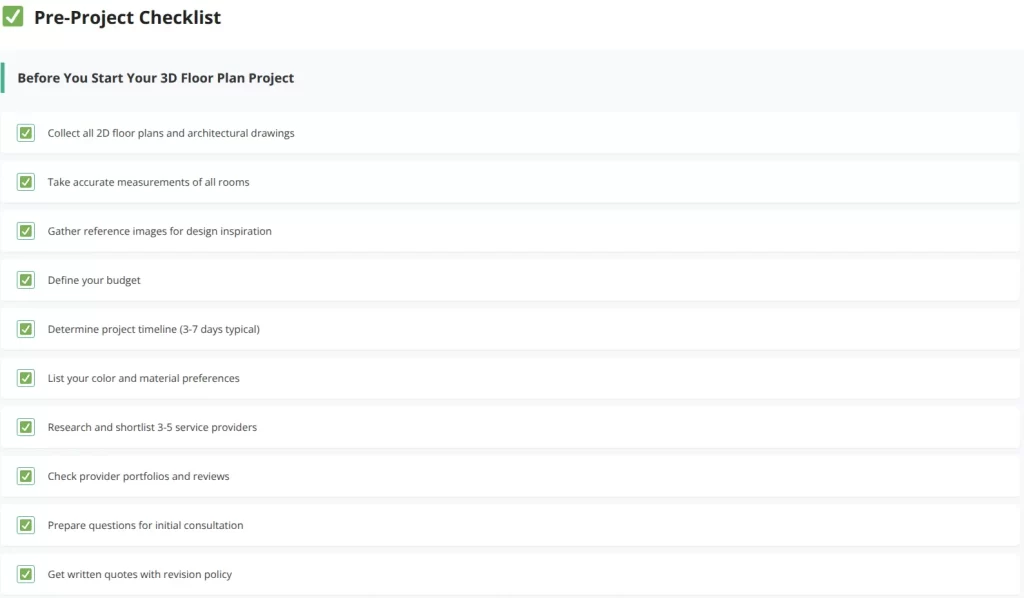
Preparation Checklist
Documents to Gather:
- Existing 2D floor plans or blueprints
- Measurement sheets
- Photographs of the space (if existing property)
- Design inspiration images
- Material and color preferences
- Furniture dimensions (if using existing pieces)
Define Your Requirements:
- Purpose of the 3D floor plan (personal use, marketing, approvals)
- Quality level needed
- Budget allocation
- Timeline requirements
- Specific rooms to include
Communication Plan:
- Designate one point of contact
- Schedule regular update meetings
- Establish preferred communication channel (email, WhatsApp, calls)
- Set expectations for response times
Working Effectively with Your Provider
Provide Clear Briefs:
Share complete information upfront to avoid delays and revisions.
Be Specific About Preferences:
Instead of “modern style,” specify “minimalist Scandinavian with warm wood tones.”
Share Reference Images:
Visual examples communicate better than lengthy descriptions.
Respond Promptly:
Quick feedback keeps the project moving and meets deadlines.
Be Realistic About Changes:
Major changes after work begins may require timeline extensions and additional costs.
Appreciate Good Work:
Positive feedback and testimonials help service providers and build long-term relationships.
Future of 3D Floor Plans in the United States
Emerging Trends:
- Virtual Reality (VR) Integration: Walk through properties using VR headsets
- Augmented Reality (AR): See furniture placement using mobile apps in real space
- AI-Powered Design: Automated floor plan generation based on preferences
- Interactive Customization: Change colors, furniture, and layouts in real-time
- Cloud Collaboration: Multiple stakeholders editing plans simultaneously
Market Growth:
The U.S. 3D visualization market is growing at 15-20% annually, driven by:
- Increasing real estate digitalization
- Growing remote and out-of-state property investments
- Modern workplace culture requiring flexible office designs
- Rising home values and renovation spending
- Demand for hybrid work-from-home spaces
Accessibility Improvements:
- More affordable services due to increased competition
- User-friendly DIY tools for simple projects
- Mobile apps for on-the-go visualization
- Integration with property portals like Zillow, Realtor.com, and Redfin
- Seamless connection with MLS platforms and real estate CRM systems
Conclusion
A 3D floor plan is more than just a pretty picture—it’s a powerful tool that transforms how we design, market, and experience spaces. Whether you’re a homeowner planning your dream house, a developer marketing properties, or a designer presenting concepts, investing in quality 3D floor plans delivers measurable returns.
The key is choosing the right service provider, communicating your vision clearly, and understanding that good visualization requires both technical skill and creative expertise. With this complete guide, you’re now equipped to make informed decisions about 3D floor plans for your next project.
Ready to Get Started?
Begin by gathering your floor plans and defining your requirements. Research service providers using the criteria in this guide, compare options, and take the first step toward visualizing your perfect space.
Remember: A well-created 3D floor plan doesn’t just show a space—it tells a story, evokes emotions, and turns abstract ideas into tangible reality. That’s the power of 3D visualization, and it’s now more accessible to American homeowners and professionals than ever before.